Caught Off Guard Novell Forge svn is Gone!


Hi All,

This is a heads up to anyone working from our svn repository. Yesterday afternoon as I tried to do an svn commit I got an error that it could not connect to the server. I figured it was a temporary issue but it was down still this morning so I did a quick google for "novell forge svn is down" and what I found totally caught me off guard. Apparently the service is shut down completely and I was never notified it was coming and did not see the announcement about it. So I had no time to prepare and migrate to another project hosting. Of course I still have the latest version of the code on my machine but all the history of changes is lost as far as I know.

It sure would have been nice if this had been communicated through more channels like an email to project administrators or to the novell forge mailing list.

So, today I have to figure out the go forward plan and execute it as quickly as possible so I can get back to normal development tasks.

The 2 viable choices as I see them are either hosting the code at SourceForge where we can continue using svn and TortoiseSVN for all source control operations or hosting the code at Codeplex. The advantage of Codeplex would be that source code activities would now be captured as project activity and possibly help us get recognized on Codeplex as being a very active project whereas in the past we never got on the list of most active projects partly because they had no tracking of our source code activity when we were hosted on Novell Forge. The downside would be that we would no longer be able to do all source control operations with TortoiseSVN. There is an svn bridge built into the Codeplex service so it would still be possible to do svn checkout and svn update and probably commit would also work, but it does not support merge which is a very important function when you maintain different branches of code and want to merge changes from one branch to another. But the real source code control system behind Codeplex is Team Foundation Server and we would have the option of using Visual Studio Team Explorer. My perception is that branching and merging is a lot different in TFS so there would be a learning curve to get up to speed as compared with continuing to use svn at SourceForge. This would only affect those with commit access though, users just doing checkout and update could use TortoiseSVN to get the code from Codeplex.

Github would also be a possibility but would require a learning curve and different tools for working with source control. I would love to have been able to consider Google Code but they don't support our use of the Common Public License and I don't think we should have to change our license to make Google happy.

At the moment I'm leaning towards using Codeplex. It is the go to place for Microsoft centric open source projects and we already host our download files there and it seems advantageous to consolidate our source code repository there. If anyone has an opinion, feel free to weigh in with comments.

UPDATE: I've completed the initial checkin at Codeplex, you can now get the latest code again, using TortoiseSVN, the url is https://mojoportal.svn.codeplex.com/svn/trunk

It was a fairly smooth migration to Codeplex and it all seems to be working ok and back to business as usual.

UPDATE 2010-05-19: We had some issues where some client machines could not get all the files using TortoiseSVN while other machines had no problems. After trying for several days to figure out why it didn't work on a problem machine we had no success in finding the cause or solution. So yesterday we reset the repository and are now using Mercurial instead of TFS. New instructions for getting the code with TortoiseAG can be found here. At first I was a little hesitant to switch to Mercurial but after reading up on it, it seemed like it might have some advantages. So far I'm really liking it better than svn.

Follow us on twitter or become a fan on Facebook

follow us on twitter become a fan on facebook

Gravatar Joe Audette is the founder of the mojoPortal project and was the primary developer until February 2017.

5 New Developer Training Videos

Just a quick post to mention that 5 more videos have been completed in the developer series of videos. Here is the full list of videos so far and more are on the way soon. The newest videos are at the bottom of the list. The series is aimed at teaching how to build custom features that plug into mojoPortal by demonstrating step by step how to implement a guest book feature. Once the series is completed I will also make the source code available.

  1. Getting the code with TortoiseSVN
  2. Source Code Overview Part 1
  3. Source Code Overview Part 2
  4. Custom Solution
  5. Hello Web
  6. Hello Web Part 2
  7. Hello Guest Book
  8. Concepts Part 1
  9. Concepts Part 2
  10. Debugging in IIS
  11. Create a Table Using the Setup System
  12. Using The Setup System to Run Upgrade Scripts
  13. Generating a Data Access Class
  14. Generate the Business Layer
  15. First Guestbook Submission
  16. Form Layout
  17. Form Layout and Data Binding
  18. Upgrading from svn and Converting to VS 2010
  19. CSS Layout
  20. Using a WYSIWYG Editor and Captcha
  21. Default Button and Input Validation
  22. Protecting Against Untrusted Content
  23. Supporting Pages Part 1
  24. Supporting Pages Part 2
  25. Supporting Pages Part 3
  26. Enforcing Security Part 1
  27. Enforcing Security Part 2
  28. Implementing the update method

UPDATED 2010-05-11: added 3 more videos 26, 27, and 28

Also don't forget the mojoPortal online user group meeting is coming up on May 18, 2010 at 8PM EDT.

mojoportal online user group meeting


Follow us on twitter or become a fan on Facebook

follow us on twitter become a fan on facebook

Gravatar Joe Audette is the founder of the mojoPortal project and was the primary developer until February 2017.

Event Calendar Pro 0.0.2.7 Released

I'm happy to announce the release of Event Calendar Pro 0.0.2.7. This is a free upgrade for existing customers, though you should first upgrade to mojoPortal 2.3.4.3. It "probably" works with mojoPortal 2.3.3.9 or higher but has only been tested with mojoPortal 2.3.4.3. Customers who already purchased Event Calendar Pro can download the new version by signing into the site and then click the "My Account" link at the top of the page, and then click the Order History tab.

Whats New?

  • Better support for time zones with automatic adjustment for Daylight Savings when creating future events.
  • It is now possible to accept will pay later ticket orders without configuring any ecommerce provider.
  • There is a new setting to allow ticket purchases/registration without having to register or sign into the site.
  • There is a new recurrence option for Bi-weekly (every 14 days) events.
  • When making recurring events that require registration, it is now possible to use the same begin date for ticket sales/registration for all recurrences.
  • Fixed a bug in the RSS feed where the urls for events were not correct if the site was hosted in a virtual directory sub folder.

Important: Since we removed the previous time zone offset setting and added a new Time Zone setting, after upgrading you should immediately go to the settings for any existing instances of the Event Calendar and set the time zone.

Event Calendar Pro Screen shot


Follow us on twitter or become a fan on Facebook

follow us on twitter become a fan on facebook

Gravatar Joe Audette is the founder of the mojoPortal project and was the primary developer until February 2017.

mojoPortal 2.3.4.3 Released

I'm happy to announce the release of mojoPortal 2.3.4.3, available now on our download page. This is primarily a minor bug fix release for issues reported in the forums since the last release, but also introduces alternate Web.config files that allow hosting mojoPortal in ASP.NET 4.0.

Hosting in ASP.NET 4.0 and the Plan for Transitioning to 4.0

Although the current release of mojoPortal is compiled for the 3.5 SP1 .NET framework, it is compatible for hosting under .NET 4.0, but requires different Web.config settings. So basically we have 4 different Web.config files

  • Web.config is configured for .NET 3.5 full trust hosting
  • Web.mediumtrust.config is meant for .NET 3.5 medium trust hosting
  • Web.net4.config is for .NET 4 full trust hosting
  • Web.net4.mediumtrust.config is for .NET 4 medium trust hosting

Whichever file you use needs to be named Web.config, so for example to run in .NET 4 medium trust you should rename the Web.config to Web.net35.config and then rename the Web.net4.mediumtrust.config to Web.config

demo.mojoportal.com has been running under .NET 4 for several days now and seems to be working well. My recommendation would be for new installations to use .NET 4 hosting to be future proof. I might hold off a bit before migrating existing installations to .NET 4 but it is time to start thinking about migrating to .NET 4 at some point in the not too distant future.

UPDATE 2010-05-15 Several people have reported problems trying to get mojoPortal working in shared hosting under .NET 4. Therefore I recommend stay with 3.5 hosting until we put out a package compiled for .NET 4.

For developers

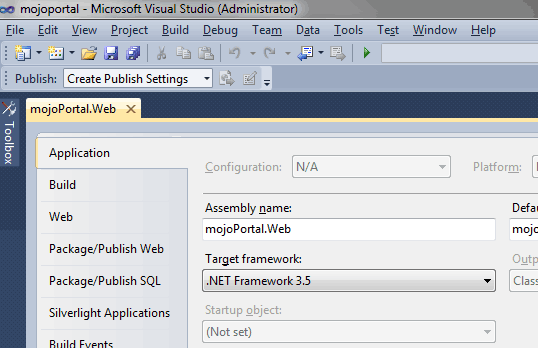
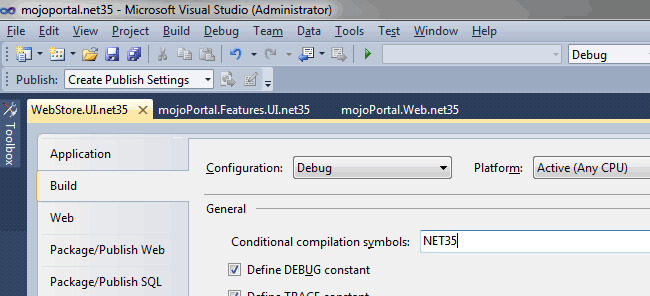
In the source code packages and in our svn source code repository, we currently have alternate project and solution files for Visual Studio 2008, but the main projects and solutions have already been converted to Visual Studio 2010. I recommend that everyone begin using Visual Studio 2010 as soon as possible. I will not be keeping the VS 2008 compatible files for long because it is more work to do so. You can also use the free Visual Web Developer Express 2010, so there should be no barrier to moving forward. After eliminating the VS 2008 project and solution files, I will then setup alternate project and solution files for .NET 3.5 and then the main projects and solution can be changed to target .NET 4. Once I do this, we will have to maintain separate release packages for 3.5 and 4.0 .NET and we will have to use conditional compilation to wrap any use of .NET 4 specific features so that we can continue to produce builds for 3.5 .NET. We went through a similar process with the transition from .NET 1.1 to .NET 2.0 back in 2005. it will be more difficult for a while having to manage supporting both 3.5 and 4.0 .NET while beginning to use some of the 4.0 features. We will probably do this for about 1 year and then we will drop the effort to support 3.5 framework. Hopefully this will give most users enough time to migrate to 4.0 .NET hosting.

Miscellaneous

  • Implemented option to allow users to choose which editor they prefer if enabled from site settings
  • Added setting to allow hiding the search box in forums per community request
  • made it possible to use a custom configuration file for the Vertigo Silverlight slideshow used in the Image Gallery and Flickr module, to be documented
  • upgrade from NeatUpload 1.3.22 to 1.3.24
  • updated Italian Translation from Diego Mora
  • added some Codesmith templates for VB.NET in source code package
  • some more refinements of TimeZone handling
  • previously we had added this to the layout.master file of skins to pre-zoom the screen for iPhone: 
    <meta name="viewport" content="width=670, initial-scale=0.45, minimum-scale=0.45"/>
    this has been removed from existing skins and I recommend you remove it from your layout.master if it is there after upgrading. The reason is that it also affects iPad, but we really don't want to pre-zoom the screen in iPad since the screen is much larger, so now we add this meta element from code only when the request is from iPhone, therefore it does not need to be in the layout.master file
  • fixed an issue where the wrong cart could be used if there were more than 1 WebStore in a site
  • other miscellaneous bug fixes for things reported in the forums

I'm still working on the series of developer training videos and you can expect to see more of them in May


Follow us on twitter or become a fan on Facebook

follow us on twitter become a fan on facebook

Gravatar Joe Audette is the founder of the mojoPortal project and was the primary developer until February 2017.

New Metro Transit Site Running on mojoPortal

Just a quick post to highlight an impressive new site running on mojoPortal. The Metro Transit site for the Minneapolis/St. Paul area is now running on mojoPortal. The site is very attractive and has a lot of custom features developed to support Metro Transit system needs.

screen shot of www.metrotransit.org

John Sanborn, the developer of the site has done a great job with this site and because of all the existing functionality in the mojoPortal framework, was able to focus on developing his needed custom functionality. Quoting John:

I have to tell you, working with mojoPortal has been a joy. Your work is inspiring and all the documentation on the site and access to the forums have really made this whole project so much easier.

The marketing people that manage all the content and input the news and alerts and maintain all the content are pretty excited about all this.

It is great to hear the success stories from our community. If you've done something really impressive with mojoPortal, let us know and maybe we will feature your site in a blog post too!


Follow us on twitter or become a fan on Facebook

follow us on twitter become a fan on facebook

Gravatar Joe Audette is the founder of the mojoPortal project and was the primary developer until February 2017.