mojoPortal 2.3.1.5 Released

I'm happy to announce the release of mojoPortal 2.3.1.5, available now on our download page.

Whats New?

Tiny MCE Editor Rises To The Top

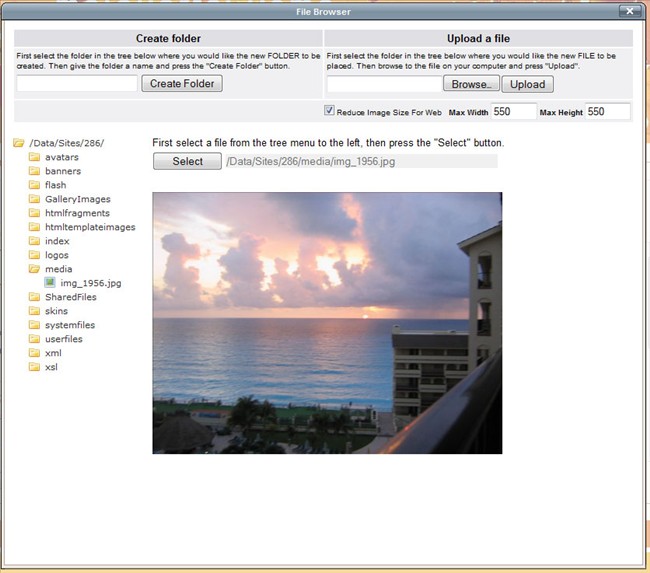
For a long time now the FCKeditor has been the best editor available out of the box in mojoPortal. It was the only one with the ability to browse and upload images and files, it was the only one with integration for our Content Template System and Content Style System, and it was the only one with a spelling checker. Not anymore! I had not upgraded the Tiny MCE editor in a long time, I had tried to once and it broke and I was busy so I reverted to the working version. But recently we've been having some issues with FCKeditor so I decided to give the Tiny MCE upgrade another try. At did not work as before but I pursued it and debugged it and found how to make it work. Then I began looking closer at the documentation and found it was really good, it even described the basic steps to build your own image browser/uploader and integrate it. I also learned how to integrate our content templates and styles. Implementing the file browse and upload was both challenging and fun. I used the jQuery File Tree, which I then extended to be able to monitor folder selection in addition to file selection, and to pre expand to the current folder after a full postback/redirect which we do when uploading files or creating folders. Then I found that they actually provide .NET code in their library to implement spell checking against the google spelling checker services. The code was very easy to integrate and it works so much nicer than the spelling checker in FCKeditor. You basically click the spell checker button and it puts squiggly lines under suspect words, you right click it and it suggests a correction. So nice! I'm notorious for typos in my blog posts, this is going to help!

CKeditor 3.0

So where does this leave us with FCKeditor you might ask. Well, the makers of FCKeditor are moving forward with a revamped version named CKeditor and they just made the first release of CKeditor 3.0. It's also already integrated with mojoPortal and I've enabled it in the new release for you to check it out. It does not have image browse or upload and it is no integrated with our content templates or styles, but it does work. The biggest problem is there is not yet enough good documentation to figure out how to do those things, but it looks very promising and I'm sure the documentation will get there at some point.

New Permissions Tab In Site Settings

In polishing up the image browse and upload experience I decided to move some settings that were previously in Web.config into Site Settings to make it easier to manage. Specifically we now have a Roles That Can Browse and Upload setting. Users in the selected roles can browse and upload starting at the /Data/Sites/[SiteID]/media folder. This is appropriate for content authors. Admins and Content Admins can browse from the /Data/Sites/[SiteID]/ folder as before. There is also a separate Roles That Can Upload and Browse to a User Specific Location. This is appropriate for users who you don't want to be able to browse your media but can upload and broswe images and other files. For example you can allow forum users to upload files if they are in these roles. The allowed file extensions are controlled from Web.config. You will find these settings in a new tab named "Permissions" under the Site Settings > Security Tab.

NeatUpload 1.3.18 Upgrade

I also upgraded to the latest version of NeatUpload. But even better, I read the documentation again and noticed something I should have noticed a long time ago. Dean Brettle, the author of NeatUpload has built in an easy to use Multi-File upload, so I have integrated it into the File Manager, Shared Files, Image Gallery, and Folder Gallery features to allow you to batch upload files. If you have Flash 8 or higher you can even ctrl-select files all at once. Pretty sweet! NeatUpload is really the best upload component for ASP.NET and its free.

Changed The DOCTYPE to Html 5 for included skins

I was tempted to do this last release but after more experiments with Html 5 I decided to do it this release. If you don't agree its easy enough to change it back to Html 1.0 Transitional in the layout.master file of your skin. This only applies to the skins I ship, if you are upgrading and have an existing skin using Xhtml it will continue to be the same. Be aware that I'm aware that there are a few places where pages do not validate as Html 5 including the login and registration pages. If you have a problem with that then please just keep using Xhtml doctype. Html 5 is still just a draft so I'm not going to get too worried about a few places where it doesn't validate, the spec may change before it becomes a standard. It validates on most pages. The things that don't validate are iframes with frameborder and scrolling attributes. Making them validate would make the page ugly and it has zero impact on any user if the page doesn't validate there, it works in all known browsers.

Minor Blog Enhancement

Added a new setting for the default allowed comment days in a blog. Previously if comments were enabled it just defaulted to 90 days and if you wanted something different you had to edit the setting on each post. Now you can set your own default.

Removed Site Office

Site Office was a prototype UI and plug-in system that was disabled by default and included no real working features that plugged in just a few stubs to demonstrate the plug-in system. It was designed for more of an application style UI rather than public web site UI. I originally built it using ExtJs but they changed licenses and I could no longer get upgrades. I've done some preliminary work to re-implement it using YUI but its not finished. I decided to remove it because the ExtJs javascript was about 9MB on disk so this reduced the size of our download packages. Developers who still want to use it can still get it from svn and deploy it themselves.

New and Updated Translations

New Hebrew translation thanks to Daniel Szasz

New Polish translation thanks to Przemyslaw Luiewski

Updated German translation thanks to Jan Aengenvoort

Bug Fixes

There were a number of bug fixes, primarily issues with some features when used in folder based child sites. A few issues that only affected pgsql. Thanks to all who reported these issues!

Gravatar Joe Audette is the founder of the mojoPortal project and was the primary developer until February 2017.

New Training Videos Thanks to Expression Studio

Recently, Microsoft announced the release of Expression Studio 3. I was very excited about this because I noticed that my MSDN subscription included it whereas in the past all I had access to was Expression Blend and Expression Web. Kudos to Microsoft for making the whole of Expression Studio available to MSDN subscribers. I don't know if it applies to all subscription levels but whatever I have now includes it and its awesome!

The new parts for me are the Expression Screen Capture and Expression Encoder. I was heavily involved with streaming Windows Media Video years ago like 2003-2005 ish but the new Silverlight technology is so much nicer today. Anyway, the Expression Screen Capture tool is like Camtasia and Wink and other screen capture tools but its pretty darn easy to use and the Expression Encoder can encode the resulting screen capture into various formats, especially .wmv that is optimised for Silverlight, but also formats like mp4 suitable for upload to YouTube or Facebook etc.

I've found some issues with the audio getting out of sync with the video on YouTube but don't really know if its some fault of the mp4 file I upload or the conversion process to Flash that YouTube does. Some of the videos I uploaded to YouTube are better than others in this regard, but the Silverlight versions are consistently good.

There is even free hosting for some Silverlight files up to 1 GB total on http://silverlight.live.com/ and I'm serving my Silveright training videos from there. Expression Encoder can generate an html page to host the video and its easy enough to modify it to point to the video on the silverlight.live.com site.

So I spent the last 2 days doing some screen capture tutorials for mojoPortal using these new tools. For most of the files I uploaded alternatives on YouTube that don't require the Silverlight plugin, but as mentioned a few of them have audio video sync problems but not real bad. Best if you can watch them using Silverlight though and one of them, the Introduction to the mojoPortal Source Code is 20 minutes long so it was too long to upload to YouTube as they limit you to 10 minutes.

Here is a list of the video tutorials I made in the last 2 days:

I was long overdue to make some more video tutorials and having these nice new tools inspired me to spend a few days on it and it was kind of fun. Hope you find them useful and informative. Now back to regularly scheduled development ;-)

Gravatar Joe Audette is the founder of the mojoPortal project and was the primary developer until February 2017.

mojoPortal 2.3.1.3 Released

I'm happy to announce the release of mojoPortal 2.3.1.3, available now on our download page.

What's New

Content Workflow!

Huge thanks go out to Kevin Needham! He did a great job implementing Content Workflow for mojoPortal. Currently its only supported in the Html Content feature but it is extensible so we can use it in other features going forward. Kevin did a great job figuring out where things needed to go, it showed he really understands the mojoPortal code. People have been asking for a better way to have a content approval process for a long time and it certainly wasn't trivial coming up with a plan and implementing it so it fit in well with the existing architecture. He proposed a strategy that made sense up front before he began and then was able to implement it without much involvement from me. He setup a private demo site so I could review the functionality for usability before he submitted the code. The code he submitted was very high quality, I implemented the alternate database support and did a little re-factoring here and there but he pretty much nailed it. I hope he will continue to be involved with the project as it was a pleasure working with him to get his work integrated into the core of mojoPortal.

Web Store Improvements

As mentioned in my previous blog post, the Web Store now supports teaser files for download products. The main use case I focused on was the ability to sell mp3 files with a teaser file and media player so musicians can use mojoPortal to sell their own mp3 files on their own web site using PayPal or any of the other supported payment options. It should be useful for other use cases as well, like selling pdf e-books and maybe having 1 free chapter or table of contents as a teaser file. It could also support a trial version for selling software downloads.

Additionally I implemented a back end order entry system so an admin can create orders. This is useful for situations where the customer does not want to purchase directly on the web site. Recently a school system inquired about buying my products with a PO number and having me invoice them, so I whipped this feature up so that I could create the order after receiving payment by check.

Miscellaneous

We've also added a setting to the blog for the default comments allowed days. Previously it always defaulted to 90 days and you would have to change it on each new post if that was not the desired setting, but now you can set a default preference.

Updated Italian Resources thanks to Diego Mora
Updated French Resources thanks to Thomas Nicolaïdès
Updated Japanese Resources thanks to Suzuki Teko

Its now possible to use Html 5 doctype easily if you choose to as mentioned in this previous post.

Various minor bug fixes as reported in the forums since the last release.

Note: You should add this to the style.config file in your skins:

<file cssvpath="/Data/style/cluetip/jquery.cluetip.css" imagebasevpath="/Data/style/cluetip/">none</file>

to support a new jQuery tooltip we use in the content workflow.


Gravatar Joe Audette is the founder of the mojoPortal project and was the primary developer until February 2017.

Issues and Strategies for Moving to Html 5

Primer on Html 5

There has been a lot of buzz in the blogosphere about HTML 5 lately, from google endorsing it as the future to the W3c dropping efforts on XHTML 2 to focus on HTML 5. The consensus seems to be that HTML 5 is the future and we should start planning on using it in the future and can even use it now. It should be noted however that HTML 5 is not a standard yet, but only a draft and is subject to change before it becomes a standard and current browser support is a mixed bag.

Some useful links:

23 Essential Resources for Html 5

Misunderstanding Markup - comic that explains HTML 5 vs XHTML.

Real World Issues for a Content Management Systems To Switch to Html 5

So from reading the above linked articles and others it seems like we can easily change to the HTML 5 DocType and things will be pretty much compatible at least as long as we don't use any of the new HTML 5 elements that might not be supported in all browsers yet. In mojoPortal the doctype is declared in the layout.master file of a skin so it can be a personal choice wheether to change to the Html 5 doctype now or not. Currently the doctype in our skins is XHTML 1.0 Transitional, so to switch to HTML 5 we would just change this:

<!DOCTYPE html PUBLIC "-//W3C//DTD XHTML 1.0 Transitional//EN" "http://www.w3.org/TR/xhtml1/DTD/xhtml1-transitional.dtd">
<html xmlns="http://www.w3.org/1999/xhtml" >

to this:

<!DOCTYPE html>
<html>

In fact I've done that here on mojoPortal.com, though I'm running a newer build than the current release (dogfooding for the coming release), so you should probably wait for the next release to do this if you want to. One of the things I've added is an option on our validator link to configure it for HTML 5 instead of XHTML like this in layout.master:

<portal:XhtmlValidatorLink id="lnkw3cValidator" runat="server" UseImage="false" Html5="true" />

This Html5=true merely changes the label and/or image on the validator link to HTML 5. I've also added a property IncludeHtml5Script to our IEStyleIncludes control

<portal:IEStyleIncludes id="IEStyleIncludes1" runat="server" IncludeHtml5Script="true" />

if set to true we inject the javscript as mentioned in this article inside IE browser comments to make it possible to use some of the new HTML 5 elements in IE 8 (though I'm not actually using them yet to avoid compatibility issues you could use them in custom features). So it renders in the page like this:

<!--[if IE]>
<script type="text/javascript">
document.createElement("header");
document.createElement("footer");
document.createElement("nav");
document.createElement("article");
document.createElement("section");
</script>
<![endif]-->


Ok But Aren't There Any Gotchas?

I got kind of excited about changing the doctype to Html 5 just in preparation for the future even though we can't use the new Html 5 elements yet without breaking some browser compatibility, especially for IE 6. I'm sick of caring about IE 6 myself and admittedly some of our skins are a little funky in IE 6 today and I don't care enough to fix them though some of them work pretty well too. Its long overdue for users of IE 6 to upgrade. But its still in wide enough use that many web site owners do care and you can make skins that work well in IE 6 using mojoPortal its just more work tweaking the IESpecific.css file and testing in IE 6. Anyway after changing to HTML 5 doctype on mojoportal.com and testing in IE 6 and not seeing any major problems I thought I would change the included skins to HTML 5 for the next release. I did this yesterday but reverted it today. I had been testing using the wc3 validator using the direct input method, viewing the source of the page and pasting it into the validator and was happy because it was reporting it as valid HTML 5. However after testing some pages on mojoportal.com using the validator link or using the url input method I got different results. It seems there is a bug in the w3c validator where if you use direct input it passes things that should not pass but when you use the url it finds problems on the same page it validated as direct input.

Specifically what I ran into was border is not a valid attribute on img and frameborder and scrolling are not valid attributes on iframe, however the presence of these attributes does not seem to be detected correctly with the direct input validation but it is detected using url validation. I reported this bug to the w3c public mailing list tis morning. Fixing the border on img was fairly easy so I did that, you can easily set the border on img using css so its really not needed to use border="0" to remove a border for example. However the iframe issue is a lot more of a problem. If you remove frameborder="0" from an iframe there is no way to remove the 3d border that is rendered in current browsers using CSS. I don't think there is a working CSS alternative to scrolling="no" either. So for the moment I choose to just live with it that a few pages on mojoportal.com won't validate but for the skins included in mojoPortal I decided it was pre-mature for me to change the doctype to HTML 5 and changed it back and leave it up to users if they want to do that. 

As previously mentioned, HTML 5 is currently just a draft so I don't want to get too concerned with validation against it while its still draft. Who knows since current browsers don't work well look right with iframes that don't use frameborder=0 and scrolling=no, maybe they will change their minds about dropping these attributes or give us an HTML 5 Transitional to validate against that will allow these for backward compatibility.

So where does that leave us?

Well I think we have to proceed cautiously and very slowly toward HTML 5 but we are very limited in what we can do in mojoPortal without breaking compatibility especially for public facing features. If I were to start using new elements and attributes of HTML 5 it will break validation for those who choose to continue using the XHTML 1.0 Transitional doctype in their skins and it would probably break functionaility and visual layout in some browsers. Potentially we could move forward in the admin pages and other non public facing pages but the benefits would be minimal. The real value of HTML 5 will be when we can use it for public facing pages, the improved semantics available using the new elements like header, footer, section, nav, article, aside etc will be of most value in public facing pages, but we really can't move there yet because of the mixed browser support. Once HTML 5 graduates to a Standard instead of a draft and browser support for the new elements is more widespread it will be tempting but we will still be faced with that fact that many people use old browsers, perhaps even we will be waiting for the end of life of the current crop of browsers anxiously like we are waiting for IE 6 to go away today. The benefits of changing to HTML 5 doctype today are minimal and there is the minor downside of losing validation on some pages where we are using iframes and maybe other issues that I have not bumped into yet. HTML 5 does indeed look like the future but the future is not here yet unless you are willing to give up support for IE 6 and possibly even IE 7 as I'm not sure if the javascript trick for lighting up the new elements in IE works in IE 7 as it does in IE 8. (update it does work) I for one don't see the merit in building browser specific applications, the huge benefit of the web has been the ability to write apps that work in all browsers though of course there have been bumps along the way like supporting Netscape 4 was back in the day and like supporting IE 6 is today, it takes some extra work. I don't want to try and move forward too fast and find myself battling to get things working in all browsers. I'm tempted to change my doctype on this site back to Xhtml 1.0 Transitional since I'm not really getting any benefit from changing to HTML 5 doctype though I have not had any major problems other than some validation issues everything seems to work the same and nothing is visually different in any of the browsers I tested.

UPDATE 2009-08-03

I actually tried this javascript create element technique with IE 6 and it seems to work! So even though the article says IE 8, it seems it should also work for IE 6 and 7. So maybe it is possible to switch to Html 5 and use the new elements. So the remaining issues would be that there will be some things that don't validate like framborder=0 and scrolling=no that we would still need to use. And the problem still remains that if I were to start using the new html5 elements that would mean that all users of mojoPortal would need to change to the Html 5 doctype because the new html 5 elements are not valid for Xhtml.


Gravatar Joe Audette is the founder of the mojoPortal project and was the primary developer until February 2017.

Super Secret Meeting at Microsoft via Channel 9

Woot! I'm in a video on Channel 9

http://channel9.msdn.com/posts/Glucose/Hanselminutes-on-9-Inside-Secret-Microsoft-Meeting-Rooms-What-Laptop-do-Alpha-Geeks-Use/

Having fun in Redmond!

UPDATE 2009-07-09

Thought I should update this post since it was really more like a tweet than a blog post.

So as you see in the video I was invited out to Redmond for a meeting at Microsoft. I had thought maybe I would be able to talk about it when I got back but I can't talk about it yet. For sure I will be able to tell all about it but not yet, probably in a month but there is not a specific date so don't hold me to it. For now you can be sure that I will talk about it at some point and lets enjoy the mystery and suspense for a little while ;-), but don't expect something really earth shaking or you may be dissappointed. 

I think I can say this without getting into trouble. Microsoft wanted to talk with a number of people about something they thought might interest us, they wanted to know if it does interest us and they wanted input and feedback. There are others that were not in the video or the meeting that are providing their feedback as well so don't over interpret the combination of people in the video. This was during a restroom break so some people were out of the room as well. For my part I can say I am interested in it and indeed excited about it.

Other than that, for the moment I can only share how much I enjoyed this opportunity to meet some folks I've followed in the blogosphere like Scott Hanselman, Phil Haack, and Bertrand Le Roy, as well as some other Microsoft folks who are very brilliant but I had not known of them before. I also got to meet some great folks involved in the Web Application Gallery which was very nice.

You may also be interested in my impressions of the experience visiting the Redmond campus. It turns out they do not all ride around on jetpacks as I had supposed ;-) Nor do they all think with one hive mind, it seems they are all quite individual and have opinions in common with one another and also differing opinons among them just like most cases where there are lots of people. A meeting at Microsoft did not strike me as much different than meetings at other companies. I did not see the entire campus of course, the parts I saw were newer from what I understand. It seemed a lot like a nice college campus appended to a classy mall and food court. I saw the company store and even got to poke around on a Surface in the little museum they have.

I also got to meet Shaun Walker and Scott Willhite of DotNetNuke. You may wonder what was it like fraternising with the competition. While we acknowledged that we do compete I found them to be really nice guys who I have a lot in common with and I felt some sense of kinship with because of our common heritage in IBuySpy and because it was easy to talk with them about our experiences as open source developers in the .NET world. I have always admired and respected what DotNetNuke has accomplished as a succesful open source project and now that I know what nice guys they are I admire and respect them even more. I would even say that their success has been a model which gives me hopes that I can achieve my own aspirations for mojoPortal. They proved it was possible to build a business around open source in the Microsoft stack and I'm not sure I would have thought it possible enough to pursue it myself had they not done it first.  I was very glad to become friends with them. I have not yet achieved the business success that I'm hoping for with mojoPortal but I feel I am making progres and will get there.

dinner with Microsoft

Bottom row Bertrand Le Roy, Phil Haack, and Bradley Millington, top row myself and Shaun Walker, this was at dinner, not the greatest photo, my iPhone is not the new model so the camera is not so good especially in dark lighting. 

Gravatar Joe Audette is the founder of the mojoPortal project and was the primary developer until February 2017.