mojoPortal includes the event logging system Log4Net. By default, system events flagged as "Informational" (and higher) severity are logged and can be viewed in Administration, System Log:
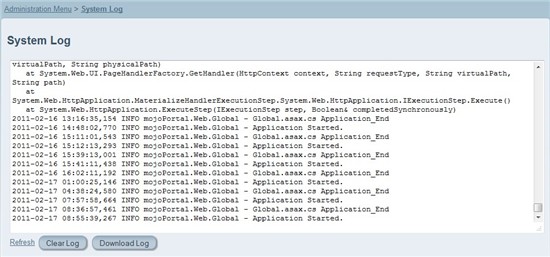
This log is stored in a plain text file in your site's data directory, named currentlog.config. By default, this file will grow to 800 KB in size, and when it is full, it will be automatically cleared and logging will start over.
If you want to change any of the logging defaults, you will need to make configuration changes in the file log4net.config, located in your site's root. Keep in mind that any changes to this file must be tracked and re-entered at each mojoPortal upgrade. To find out more information about a particular configuration parameter in log4net.config, perform a web search like: "log4net maximumFileSize".
Sample Configuration Changes
<maximumFileSize value="1MB" /> - Configures the log file to grow to 1 MB before it is truncated (and potentially rolls into a backup). Values above 800KB are not recommended here, since the file must be displayed on the web when viewing through Administration, System Log.
<maxSizeRollBackups value="5" /> - Save five rolling backups of the log. They will also be placed in /Data, and named currentlog.config.1 through currentlog.config.5. With backups enabled, when the log file reaches its maximum file size, the contents are copied to a backup file before the log file is cleared, providing more log history.
Note: Before enabling rolling backups, we strongly recommend that you test to ensure your site will not serve these files to anonymous users. To test this, you can create a file in /Data called currentlog.config.1 and put some plain text in it, then navigate in your browser to http://www.mysite.com/Data/currentlog.config.1. If the server is set to reject requests for this file, you will get a 404 error (which is the desired result).
<level value="ERROR" /> - Set the logging level to a severity of errors and higher.
Logging System Events to the Database
To enable logging to the database you will need to edit the log4net.config file in the root of your site, and you will need to remember to not overwrite your custom log4net.config file during upgrades.
To use database logging, uncomment <appender-ref ref="mojoSystemLogAppender" /> and then comment out <appender-ref ref="RollingLogFileAppender" /> in the log4net.config file.
Next, add <add key="UseSystemLogInsteadOfFileLog" value="true" /> to the user.config and touch the Web.config or restart the site, so the changes are read by the server.
Typically, there is no reason to log to both the file system and the database, but it is possible if you don't comment out the RollingLogAppender in log4net.config and if you want to be able to view both the file system log and the database log from the UI, you can add <add key="ShowFileLogInAdditionToSystemLog" value="true" /> to the user.config.
Additional config settings and their default values:
<add key="SystemLogDeleteOldEventsOnApplicationStart" value="true" />
<add key="SystemLogApplicationStartDeleteOlderThanDays" value="10" />
<add key="SystemLogPageSize" value="10" />
<add key="SystemLogSortAscending" value="false" />