Localization Overview
A mojoPortal content management system based website can be localized into any single language or culture.
mojoPortal CMS also has partial support for multiple languages within a site using resource fallback as discussed below.
To truly support multiple languages, it is our observation and belief that you should make a separate site for each language you plan to support and you should have content authors and site administrators to support each language. If you want to cross-link the language specific sites, you can easily do that in the heading section of the skin (layout.Master file) that you are using for your site. For example, we would have the main site at www.somedomain.com and if we were going to also have a French site we would make it fr.somedomain.com.
Language/Culture Configuration in mojoPortal
The primary culture configuration is established in the Web.config file at the root of the site.
<globalization
			    culture="auto:en-US"
			    uiCulture="auto:en"
			    requestEncoding="utf-8"
			    responseEncoding="utf-8"
			    fileEncoding="iso-8859-15"
			/>
The globablization element is a standard ASP.NET feature, more information can be found in the MSDN documentation for the CultureInfo Class.
Important: Note that we recommend that you do NOT modify the globalization element in Web.config (except perhaps for fileEncoding), the reason is that if you set the default to a language other than English and the resource files for that language are not fully translated and have missing keys it can cause null reference exceptions to occur. We have a better way to force a specific language documented in the article Forcing a Specific Language. By using the recommended approach you can force a specific language but if there are missing keys it will fall back to English for the missing keys. English is the only language that we guarantee to not have any missing keys.
In the example above which comes from the standard mojoPortal Web.config file, "auto:en-US" means to try and use the Resources for the user's preferred language (as configured in the browser), but if the correct Resources cannot be found then fall back to the default language/culture for Resources which in this case is configured as en-US (English language, US region specific). You can specify any culture as the default. If you want to force a specific culture and not use Resource Fallback, you can simply remove the "auto:" from the setting and use en-US or some other language/culture.
Note: above I use the term "Resources" to mean primarily text that is used in standard labels and buttons in mojoPortal. Resources for mojoPortal are stored in the App_GlobalResouces folder. See Translating mojoPortal for more information about creating/editing Resource files. In mojoPortal, since the main developer is from the US and speaks English and since mojoPortal is under active development, the most complete Resource file is the one for English. If you use something other than en-US for the default culture, you should make sure there are no missing keys in the resource file for your default culture by comparing to the English resource file.
Note: for more information on culture names like en-US, see the National Language Support API Reference.
Content Translation
Look, just because you set your language to french, that doesn't mean everything on your site will be translated to french. Only System Strings will be translated via resource files.
Resource Fallback
To understand how Resource Fallback works, set your browser language preference to one of the above languages but not English, save your settings and refresh this page in the browser. For example, if I set my preferred language to Persian, the link labels at the top of the page and the Search button are now in Persian

Of course content in the content system is coming from the database and is still in the language it was authored in, this is why I say to truly support additional languages you sould make a separate site for each language with content authors and site administrators dedicated to producing and managing content for each language.
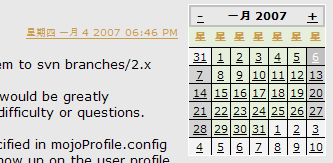 In ASP.NET, the CultureInfo property of the executing thread is what primarily determines how resources are selected and how other things like currency and dates are handled. The auto: in the globalization setting shown at the top of this page tells the runtime to set the executing thread's CultureInfo property to the culture preference passed in the request header by the browser. This happens regardless of whether a Resource file exists for the preferred culture so for example if I set my browser preferred language to Chinese - Singapore, even though there is no Resource file for that language currently in mojoPortal, the Calendar in the blog adapts using built in features of ASP.NET as shown.
Most of us in the US are familiar with the Gregorian calendar, however, there are many cultures that use different calendars than we do here in the US. The ASP.NET runtime tries to make this transparent to developers so that we don't have to think too much about supporting different calendar systems, however not all calendars are implemented fully or correctly in ASP.NET.
Currently Supported Languages
The mojoPortal Languages Support repository on GitHub has all of the currently translated languages.
All non-EN-US languages are in this repository.
Languages are organized by their IETF Language Tag. To use a language, download this repository and copy the contents of the language you need into the root of your mojoPortal installation. If you do not see your language below, please consider helping by providing a translation.
We need translators for this project. If you are fluent in a language other than English and you use mojoPortal, please consider helping.
| Tag |
Language |
Country |
| ar |
Arabic |
|
| ca |
Catalan |
|
| cs |
Czech |
|
| da |
Danish |
|
| de |
German |
|
| el |
Greek |
|
| es-ES |
Spanish |
Spain |
| es-MX |
Spanish |
Mexico |
| fa |
Persian |
|
| fo |
Faroese |
|
| fr |
French |
France |
| fr-CA |
French |
Canada |
| he |
Hebrew |
|
| hr |
Croatian |
|
| hu |
Hungarian |
|
| it |
Italian |
|
| ja |
Japanese |
|
| nl |
Dutch, Flemish |
|
| no |
Norwegian |
|
| pl |
Polish |
|
| pt-BR |
Portuguese |
Brazil |
| pt |
Portuguese |
|
| ru |
Russian |
|
| sk |
Slovak |
|
| sl |
Sinhala, Sinhalese |
|
| sv |
Swedish |
|
| ta |
Tamil |
|
| th |
Thai |
|
| tr |
Turkish |
|
| vi |
Vietnamese |
|
| zh-CHT |
Chinese (Traditional) |
|
| zh-CN |
Chinese (Simplified) |
|
Forcing A Specific Language
mojoPortal content management system provides configuration settings to specify the language used by your web site and through the mojoPortal Languages Support project, we provide translations for 33 languages. Not all of the provided languages are complete. With most releases, there are at least a couple new strings (labels, button text, etc...) that need to be translated. If you're interested in helping with translations, you can get started here.
Configuring Your Site
There are two things that need to be done to configure your site for forcing a specific language.
- Apply settings in user.config
- Copy localized translation files to your website.
Apply Setting in user.config
Add the following to your user.config file
<add key="UseCultureOverride" value="true" />
The following settings need to be adjusted for your language and the site the language should apply to. In the code below, site1culture would change to site3culture if the language is supposed to apply to the site with ID=3; it-IT would change to nl-NL if your language is Dutch - Netherlands.
<add key="site1culture" value="it-IT" /> <!-- change it-IT to the correct language culture code for your language -->
			<add key="site1uiculture" value="it-IT" /> <!-- change it-IT to the correct language culture code for your language -->
Note that culture determines which culture is used for formatting of dates and currency, whereas uiculture is what determines which resources file is used for string localization. For string localization it will fall back to English if there are missing keys in the translated resource file(s).
If you are not forcing a specific language then the default behavior is to adapt to the preferred language according to the user's browser language settings.
Copy Translation Files
- Download current translation files.
- Unzip the archive to your desktop.
- Upload the contents of the folder named with your language-culture abbreviation (e.g., es-ES for Spanish-Spain) to the root of your mojoPortal installation.
Setting Browser Languages
If you want to change your default browser language, for testing purposes or otherwise, here are some links to documentation on how to do that from various browser vendors:
Using Multiple Languages
In mojoPortal content management system, I recommend you use one language per site as the best way to organize language specific content. The idea of a site can be blurred by our support for multiple sites in a singe installation and related sites mode which allows the same users and roles across sites. By using the same or similar skins in each site a visually seamless experience can be created between the sites by linking them together with flags or text links indicating the language. This also provides the possibility in the future if traffic for one of your supported languages becomes much higher than the others, you could split them onto different servers later on.
Sites Can be Related
mojoPortal CMS has support for hosting multiple sites from a single installation. Sites can be completely independent, but in supporting multiple languages its better to use "Related Site Mode", this way all the sites share the same users and roles, but each site has separate content. This can provide a good way for you to separate the content by language and allow your users to seemlessly navigate through the sites as if they were one site. In fact, if you use folder based child sites with related site mode then once a user has authenticated in any of the sites he is also authenticated in all the sites since they share the same users and the same domain cookie.
So for example if my primary language is English and my site is http://www.somethingcool.com then the main site at that url will be in English. Now suppose we have operations in Spain and would like to now have a Spanish version of our site, so we create a child site at http://www.somethingcool.com/es/ and we have our Spanish partners write the content for that site. We link the sites together with some flag or language indicators (like you see in the upper right corner of this site - however the language sites here are not linked together using Related Sites Mode as I'm discussing here.).
Be aware that unless you some custom configuration on the Web Server, to support this folder url http://wwwsomethingcool.com/es/, after you create the site you will need to actually create the /es folder and put an empty text file there named Default.aspx. THe purpose of this file is just to make sure IIS hands the request to .NET. There are ways of configuring IIS so you don't need this, in IIS 7 there are modules that can map .NET as the default handler and in IIS 6 you can use custom ISAPI filters that are widely available. In hosted environments where you don't have control to do this you can just create the folder and file.
The other way that is commonly seen to segment different language sites is by host names. So instead of using http://www.somethingcool.com/es/, we could use http://es.somethingcool.com or www.somethingcool.es. mojoPortal supports this with host name based child sites and you can use Related Sites Mode with host named sites as well. The only difference is that because each host name has a separate cookie, they do not share an authentication ticket, so users have to sign in to each site, though the credentials are the same for each when using Related Sites Mode.
For more information, see Hosting Multiple Sites on One Installation.
Currency & Time Zone Localization
mojoPortal content management system generally stores date/time values in the database as UTC and provides timezone adjustment when displaying date/time data according to the user's time zone as specified on the My Account page.
For unauthenticated users, time is displayed using the default time zone from Site Settings, whereas for authenticated users (users who are signed in) it is based on the time zone from the user profile.
When new users register on the site they can choose their time zone or leave it at the default setting which comes from the Site Settings time zone.
Time will adjust correctly even during daylight savings time.
Note that our time zone system does not work correctly under Linux/Mono, so in that environment it uses time offsets that don't adapt to daylight savings time.
Non-ASCII URLs
In mojoPortal content management system we do not url encode all the characters of friendly urls and for many languages it seems to work ok with non-ascii urls even though the spec says that urls should always be url encoded.
It is also possible to use the closest ascii equivalent for some languages with this setting.
<add key="UseClosestAsciiCharsForUrls" value="true" />
A good discussion of the challenges of using non-ascii characters in urls can be found in this blog post by Keyvan Nayyeri http://nayyeri.net/nonenglish-urls
Due to some of the problems many people choose to use English urls even though it is less than ideal. For languages that use similar alphabets to English, we can also use a strategy to replace the non-ascii characters with their closest ascii equivalents.
Disabling Friendly Urls
If friendly urls are not working for your language, it is possible to disable them and then CMS pages will be served using /Default.aspx?pageid=x instead of friendly urls. This is the real url that serves the pages as discussed in How mojoPortal Works.
Add this to user.config:
<add key="UseUrlReWriting" value="false"/>
To disable friendly urls in the blog also add this:
<add key="Blog:UseFriendlyUrls" value="false"/>
Help Us Translate mojoPortal!
The mojoPortal Language Support Repository on GitHub has all of the current language translations. Some are old, some are up-to-date.
App_GlobalResources contains resource files that populate the labels and buttons in mojoPortal. Copy the Resource.resx file and the ProfileResource.resx file to a different folder then rename them for the new language using one of the culture names from here.
So for example, to translate to French I would name the files Resource.fr.resx and ProfileResource.fr.resx. If I wanted to use the specific dialect of French spoken in Belgium and other culture aspects specific to Belgium I would name the files Resource.fr-BE.resx and ProfileResource.fr-BE.resx
After the files are renamed, copy them back to the App_GlobalResources folder and edit them to translate the text to your own language. If you are a developer and you have Visual Studio, you can edit the files more easily, but these files can also be edited with a Text Editor.
Additionally, there are files in
siteroot/Data/MessageTemplates
and
siteroot/Data/HelpFiles
that can be translated and named with a culture name prefix.
New translations and updates to existing translations are always welcome. If you would like to help with translation please contact us.
Update 2012-12-20 Some of our translators are working with this free desktop app to translate the .resx files.