Creating Content Templates
Creation of Content Templates is best explained in this video: Training Video about Creating Content Templates.
Content Templates can be created to allow easier content creation for your site content authors. mojoPortal content management system comes with a few templates and you can add custom templates (as of mojoPortal CMS version 2.3.0.8) by using the Administration Menu > Content Templates tool. You can even control which roles the templates are available to.
Content Templates were first available in 2.3.0.4 using FCKeditor. As of 2.3.1.5, you can use them with TinyMCE and as of 2.3.3.2, you can use them with CKeditor.
Using Content Templates in FCKeditor
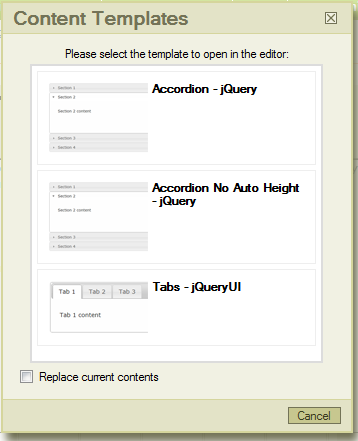
In mojoPortal 2.3.0.4 we introduced some content templates to make it easy to use widgets like the jQuery Accordion or jQuery tabs. These content templates show up in the FCKeditor toolbar using the button to the left of the "Style" drop-down.

clicking the button reveals a list of content templates like this:
CKEditor Known Issue
Because of the way Content Templates are implemented for CKEditor, in some cases the use of single and/or double quotes may cause the template group to become invalid. If this happens, none of the Content Templates will be displayed when you click the button. To resolve it, you can either remove the quotes from the text, or encode them. For example:
The alligator grew from 5'6" to 6'7" in one year.
Possible replacement 1:
The alligator grew from 5 feet 6 inches to 6 feet 7 inches in one year.
Possible replacement 2:
The alligator grew from 5′6″ to 6′7″ in one year.
Using Content Templates in TinyMCE
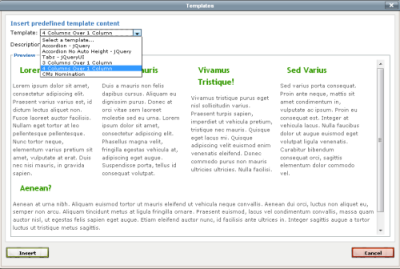
Starting with mojoPortal 2.3.1.6, content templates are available in TinyMCE. They are accessible by clicking the button to the left of the "Format" drop-down.

Clicking the button reveals a window with a list of content templates. Selecting a template from the list will show a preview of the template.
System Templates
We still include some "system templates" we have defined for the jQuery Accordion and Tabs, but you can optionally remove them. By Default the system templates appear in the list before any that you create yourself. It is possible to make it show the system templates after your custom templates instead of before them or to not show them at all. The relevant web.config/user.config settings are:
<add key="AddSystemContentTemplatesAboveSiteTemplates" value="true" />

	<add key="AddSystemContentTemplatesBelowSiteTemplates" value="false" />
Last Updated 2011-07-11 by Joe Davis