Creating Pages
Creating pages in mojoPortal is very easy. Simply log in as a user with permission to create pages and click the New Page link in the admin drawer.
Moving Pages
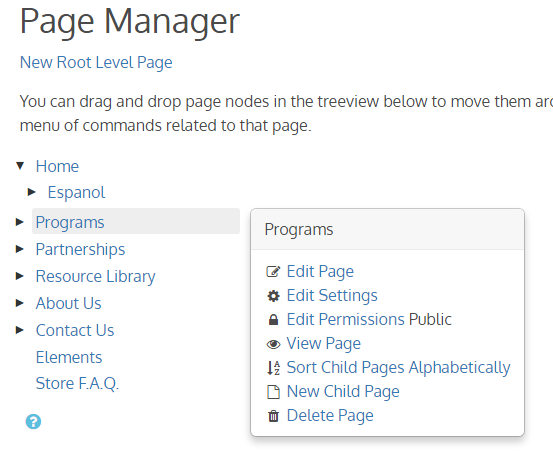
To move a page, click the Page List link in the admin drawer or go to Administration > Add/Edit Pages. The Page Manager will load and you can drag your pages around to put them in the right place.
Showing Secured Pages in Menu to Anonymous Users
Note: this doesn't show the content of the secured page, it just adds a link to the menu for the secured page.
mojoPortal content management system is designed with Role Based Security and pages are filtered from the menu based on roles so that users can only see links pages for which they have permission to view the page.
mojoPortal CMS also has a built in role named "Authenticated Users" that users are added to by default when they register on the site. This allows you to easily create pages that can only be seen after the user signs into the site.
Sometimes you may want to show the page link in the menu when the user is not signed in, but when he clicks the link you want to redirect him to login and forward him to the to page after he signs in. There is a way to accomplish this when the need does come up as described in the steps below.
- Create the secure page like http://yoursite/yoursecurepage.aspx and set the View Permissions in Page Settings to "Authenticated Users".
- Create another page at the same menu level and sorted directly above or below the secure page and set View Permissions to "all Users" so that even unauthenticated users can view it.
- Give the 2nd page the same page name as the secure page so it will have the same text link as the secure page.
- Check the box in Page Settings of the second page for Hide From Authenticated.
- Set the url for the 2nd page to use the fully qualified url of the secure page like http://yoursite/yoursecurepage.aspx
Now unauthenticated users will see the link in the menu the same as if the secure page link was visible and when they click the link they will be prompted to sign in. After they sign in the secure page will show in the menu because it is visible to Authenticated users and the 2nd page will disappear because it has hide from authenticated checked.