The Publish feature of Visual Studio has evolved a lot over the years and we use it for creating the official mojoPortal release packages and for packaging custom modules as well.
When you have developed a custom feature for mojoPortal, you should not need to create your own mojoPortal release to support your custom features. If you do, you have forked the code and you are causing yourself more heartache. These instructions will help you understand how to create your own module release packages that can then be installed on existing mojoPortal websites.
To get started, there are a few things you will want to tidy up. These steps aren't entirely required but they will make your life a lot easier if you go ahead do them.
- Set the "Copy Local" option on references you do not need DLLs for in your custom package to False. Essentially, you only need your own DLLs and those which aren't included in the mojoPortal release. To set the references' "Copy Local" option, go to each of your projects in mojoPortal and select all of the references (click on the first one, hold down shift and click on the last one), then using the ctrl key, click on the references you need to publish with your package to deselect them. Now, right-click on any of the remaining selected references and click Properties. Set the "Copy Local" option to false.
- Set the "Copy to Output Directory" option on the packages.config and web.config files in your Web projects to "Do not copy". Find the file, right-click and select Properties.
- Add paths to folders that you do not want in your releases to the ExcludeFoldersFromDeployment setting in your projects .csproj file. How: right-click
Using the Visual Studio Publish Feature
You can compile the full solution, then Publish the mojoPortal.Web project and it will correctly include all the needed feature files. This is now possible due to improvements in Visual Studio 2013. In previous versions the Publish feature could only publish files that are part of the project and listed in the .csproj file, so it did not work well with our project structure where we keep features in separate projects and use post build events to copy the needed files up to the main Web folder. Since these files were not listed in the .csproj file, then they would not be included in the package produced by Publishing. But in VS 2013, we have a configuration choice for Include All Files in project folder. So we were able to change to this and add some exclusions to leave out the C# source code. So now the Publish feature in Visual Studio 2013 works well for packaging mojoPortal. This is really good news for those who want to use continuous integration and integrate mojoPortal into their own build process. You do need to rebuild the entire solution in release mode before publishing in order to include all the features.
I usually Publish to a local file system folder but other options should also work. But definitely if you are publishing from your development machine you should publish to a local folder first and clean up extra files from your development environment that should not be uploaded to production. Things such as the /Data/currentlog.config file, any files under /Data/systemfiles or /Data/Sites/[SiteID]/systemfiles or /Data/Sites][SiteID]/index should not be included. Other files such as images related to content on your dev machine are also files you may not wish to include in your deployment package.
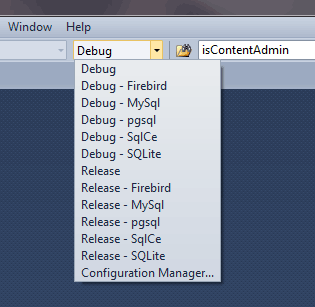
- Choose the Release configuration for your chosen database platform, the one that just says "Release" is for MS SQL Server.
- Rebuild the entire solution
- Right Click the mojoPortal.Web project and choose Publish
Deployment To Production
When I speak of deployment to production, I mean deployment of an updated build of the code. I do not mean deployment of data from a development or staging machine to production. I recommend that you always create and edit data on the production server and never try top push data from a development or staging machine up to production. Data should always go the other way, that is you get a backup from production and restore it in your development or staging environment. Creating data on your development machine and then trying to move it to production will lead you to more difficulty. You will especially have trouble if your development url is a virtual directory like http://localhost/mojoportal and your produciton environment is a root web site like http://www.somesite.com. Also trying to push data up to production will leave the search index on production out of sync with the content in the database. Save yourself some grief and follow my advice on this.
So the general flow will be as follows:
- get a backup of the database from production and restore it on your development machine
- get the latest mojoPortal from svn and rebuild the solution
- then visit the /Setup/Default.aspx page on your development machine to run the upgrade scripts for the database.
- if all goes well you can expect it to go the same way on production, it may be prudent to do some testing on development or staging before proceeding with production deployment
- rebuild your solution in release mode
- package your files using UnLeashIt as documented above
- deploy your packaged build to production
- visit /Setup/Default.aspx to run the upgrade scripts on the production db
Thats it, your production system is up to date and in sync with your development or staging environment.
Last Modified by Joe Davis on Jul 12, 2022